Signing in and resetting your password
How to sign in with your email or mobile number, what to do if you forget your password, and why sign-in can be locked for a short time.
Updated
Sign in
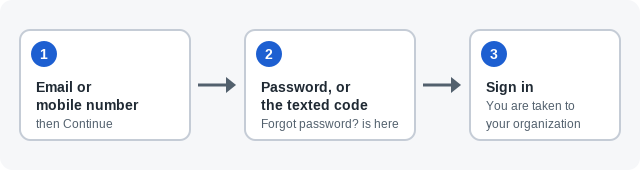
- Open the sign-in page.
- Type your email address or mobile number and select Continue.
- What you see next depends on how your organization signs in:
- Password: type your password and select Sign in.
- Code by text: if you typed a verified mobile number, a 6-digit code is sent to it. Type the code and select Sign in. To use your password instead, select Use a password instead.
- Company sign-in: if your organization uses its own sign-in (single sign-on), you are taken to your company's sign-in page. Sign in there and you come back to the app.
To start again with a different email or number, select Use a different email.
Reset a forgotten password
- On the sign-in page, type your email address and select Continue.
- Select Forgot password? above the password box. You can also open the reset page directly.
- Type your email address and select Send reset link.
- Open the email and select the link. It works once and expires after an hour.
- Choose a new password of at least 8 characters, type it twice and select Set new password.
- Sign in with your new password.
If no email arrives, check your junk folder. For privacy, the page says the same thing whether or not the address has an account, so check that you typed the address you use for the app.
When the password changes, you are signed out on every other device, and you get an email saying the password was changed.
If the link says it has expired, request a new one and use the newest email.
If your account is locked
After several wrong passwords in a row, sign-in is locked: for 5 minutes the first time, then 10, then 30 if it keeps happening. The sign-in page shows how long to wait. You can wait and try again, or reset your password: a completed reset unlocks the account straight away.
If you sign in with a mobile number only
If your account has no email address, a reset email can't be sent. Ask your organization's administrator to set a temporary password for you. They give it to you in person. Sign in with your mobile number, select Use a password instead, type the temporary password, and choose a new password when asked.
Still stuck?
Your organization's owner or an administrator can send you a password reset email from the Users page. If that doesn't help, contact support.